


How to meal plan with Google calendar - This tutorial is great for beginners because it shows you step by step how to meal plan for a week or for a month using online shareable tools. Good for a family or just one or two people. Includes healthy budget friendly recipes.
For months and months, Joe and I argued about what to have for dinner almost every night.
The conversation would go something like this:
Joe: What should we have for dinner?
Me: I don't know. What do you want to have?
Joe: I asked you first! Why do I always have to make all of the decisions?!?
Me: Are you serious? You don't make all of the decisions! I make all of the decisions, and I'm tired of it. Why can't you choose something once in a while?
No kidding. Isn't that absurd?
I was determined to end the madness by planning out a menu in advance. I had tried to start (and failed) many times before, but I was determined this time to figure it out and make it work.
Here's what I came up with -
How to Make a Meal Plan with Google Calendar
1. Create a Calendar
I started small, creating a new Google calendar for our menus, calling it Meal Plan and sharing it with Joe (in the Calendar Settings page). I wanted him to be able to view and make changes to the calendar, so I told Google Calendar to give him permission to make changes to the menu and added his email address.

2. Add in Recipes
A year or two ago, Joe and I made a binder cookbook of our favorite recipes (you can grab our binder system here). I found that book and flipped through it, finding a recipe for each day. I planned out only our dinners, and I skipped days when we already had dinner plans.
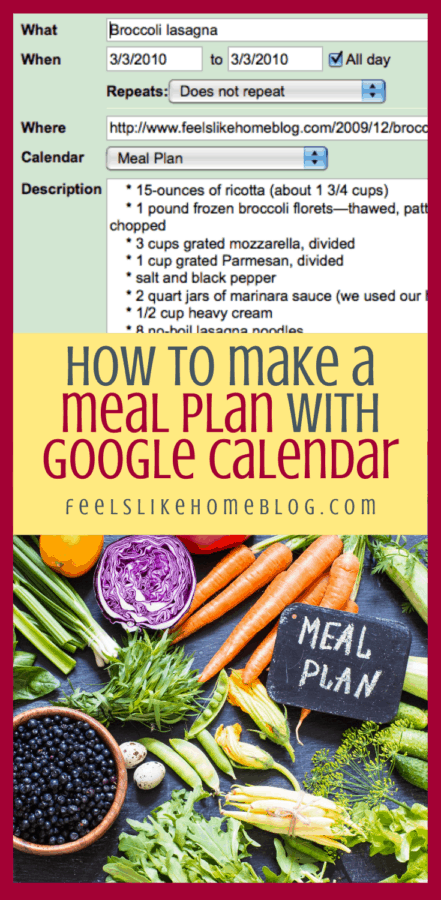
I typed the ingredients for each recipe (or copy/pasted if the recipe was online) into the event details.
For the recipes that are online, I also included the URL (so that whoever was making it could grab the recipe from there rather than digging through cookbooks).
For recipes that are not on my blog, I included the name of the cookbook.
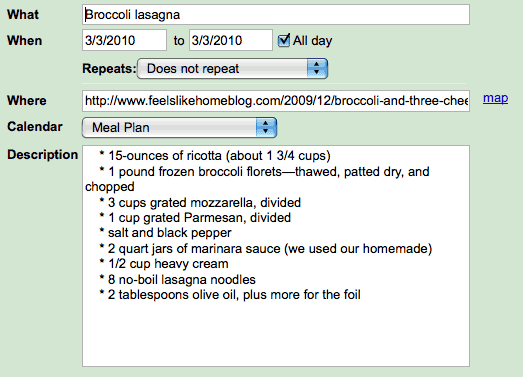
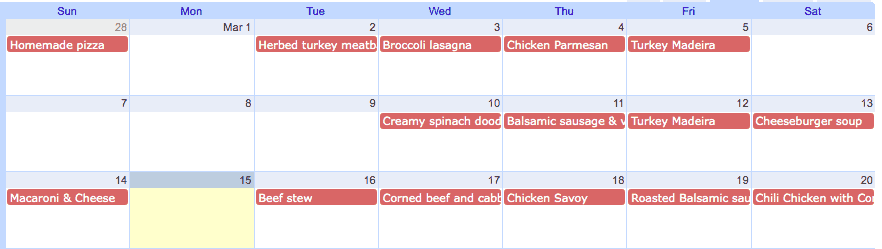
When I was finished, we had a few weeks' worth of meals, all planned out.
Changing Plans
There are some blank spots in the menu because we changed our plans. It's really simple and easy to change a meal to another day, in the event that we decide to go out to eat or have lots of leftovers or whatever. We just click on it and drag to a new day.
Repeating Meals
Repeating meals is easy. If you want to repeat a meal on the same day, at regular intervals, you can add that in the Repeats section. (See the green photo above for the location of the Repeats info.)
If you want to repeat a meal, but not on the same day of the week, you can use the copy function. After clicking on "copy to my calendar," the meal will pop up again on the same day.
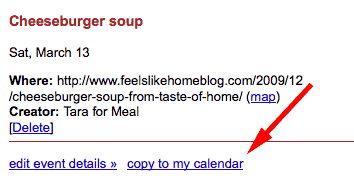
Drag that new event to the new date you've chosen, click on it, and change it to your Meal Plan calendar. It is that easy.
Make Meal Planning a Family Event
Joe's even gotten involved. When he has some extra time, he logs on to the calendar and adds recipes. That's how corned beef and cabbage (a meal I detest) snuck in there on St. Patrick's Day.
I can see us continuing to plan our menus this way for a long time because it's easy, and we can cooperate.
More Meal Planning Resources
2020 update - I know some people prefer to meal plan on paper, and for those people, I created the Meal Planning Made Easy system. We moved from Google calendar to the paper system a couple years ago and like it a lot. Joe is not a high tech guy, and so doing the plan on the online calendar didn't work very well for him in the long term. He used it when it was new and novel, but after that, he fizzled out. Here's the link to our paper system:
Get a whole month's worth of meal plans - free!
Head over here to sign up to receive a menu plan with 30 dinners, 30 desserts, and 30 breakfasts.



FeelsLikeHomeBlog says
You are very welcome. 🙂
Sara says
This TOTALLY sounds like me and my husband! I'm going to set it up NOW! Thank you for sharing!
meeSha says
WOW! I love GCal and why didn't I ever think of this?!? I always get SMS/Text Messages from GCal for bill paying etc etc, but the endless possibilities of having this with the meal plan? Have reminders pop up on my iphone? Just wow. This is the best tip I've ever read. Thanks so much for sharing!! Off to creating a Menu Plan on GCal!!
meeSha says
WOW! I love GCal and why didn't I ever think of this?!? I always get SMS/Text Messages from GCal for bill paying etc etc, but the endless possibilities of having this with the meal plan? Have reminders pop up on my iphone? Just wow. This is the best tip I've ever read. Thanks so much for sharing!! Off to creating a Menu Plan on GCal!!
KNunnelley says
This is GREAT! We've been doing meal planning using good ol pencil and paper for months. This is a wonderful idea. I have 2 weeks worth done, entered, and the grocery list entered into my task list like Ben mentioned. My only question... How can I make it PRINTER friendly so I can have my menu and my recipes available both ONLINE and in my Meal Planning Binder for easy use while cooking in the kitchen?? Any thoughts???
FeelsLikeHomeBlog says
Thanks Kristin 🙂
It is simple to print a calendar on Google Calendar. Next to the
Day/Week/Month tabs, to the left of those, is a Print icon. When you click
it, a new window will open with printer options. If you choose to show only
your menu planning calendar, that's all that will print.
Does that make sense?
Kristin says
Yeah makes total sense...I can get the actual calendar to print...and my "task list" grocery list... but Is there anyway to print my day details so I can see the recipes I've added in event details? (I like to have mine printed and put in order of my meal plan for easy access! :)) Or do you just bring up your online recipe each time you make a meal and use your computer? 😉 Thanks again!
Michelle {EverythingMom} says
Just saw this now - thanks so much for linking up EM!
Joy says
I use Google calendar for my meal plan but hadn't thought to add the actual recipe to it! I divide mine into the following categories: breakfast, lunch, supper, treats, & prep. Treats is for our regular Friday night dessert, special occasion desserts, or "company's coming" desserts. Prep is to remind me to thaw a whole chicken a few days before I need it or start something that needs to be done overnight.
Anonymous says
That's a great idea!
Tami says
Terrific idea!
Tara @ Feels Like Home says
I copy and paste the ingredients in the Notes section.
TeeKay says
Great idea! Thank You for sharing!
T says
What a fantastic idea!!!! I love this!!
Valerie A. Kremer says
Thanks so much!! This is so helpful! I also like the fact that you can move things around with the Google calendar.